How Apple Platform Single Sign-On moves Mac authentication into the operating system
Overview
Password resets consume IT time, users juggle separate credentials for each app, and phishing campaigns target those same passwords. Apple Platform Single Sign-On (Platform SSO) addresses all three. It extends single sign-on from the app layer into macOS itself, so one organizational sign-in covers the login window, the Lock Screen, and every app your identity provider protects.
Key Terms
| Term | Definition |
|---|---|
| Identity provider (IdP) | The cloud service that stores organizational identities and issues tokens, such as Microsoft Entra ID, Okta, or Ping Identity. |
| Platform SSO | An Apple framework, introduced in macOS 13, that lets an IdP's SSO extension handle authentication at the macOS login window, Lock Screen, and in apps. |
| SSO extension | The IdP app component that macOS calls to authenticate users. Examples include Microsoft Company Portal and Okta Verify. |
| Secure Enclave | A dedicated security subsystem in Apple silicon, isolated from the main processor, that generates and protects keys. See Apple Platform Security: Secure Enclave. |
| Shared device keys | A single set of signing and encryption keys for all users on a Mac. Required for Simplified Setup, account creation at login, Authenticated Guest Mode, and network authorization. |
| Simplified Setup | A macOS 26 feature that requires Platform SSO registration in Setup Assistant during Automated Device Enrollment and can create the first local account from the IdP identity. |
| Authenticated Guest Mode | A macOS 26 feature that creates a temporary account for an IdP user and removes the data after the session ends. Designed for shared Macs. |
| Tap to Login | A macOS 26 feature that lets users sign in to Authenticated Guest Mode by tapping an employee badge in Apple Wallet on an NFC reader. |
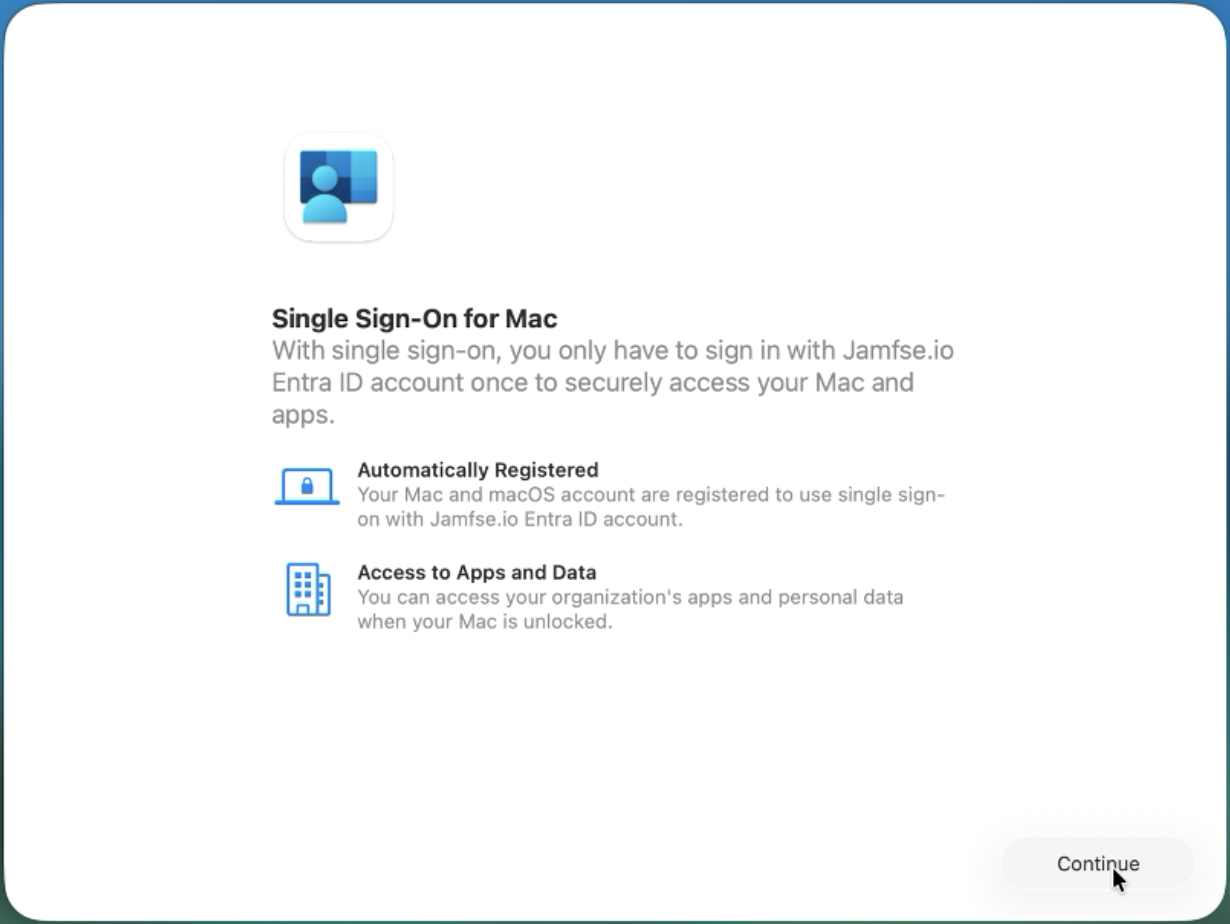 Simplified Setup requires Platform SSO registration in Setup Assistant.
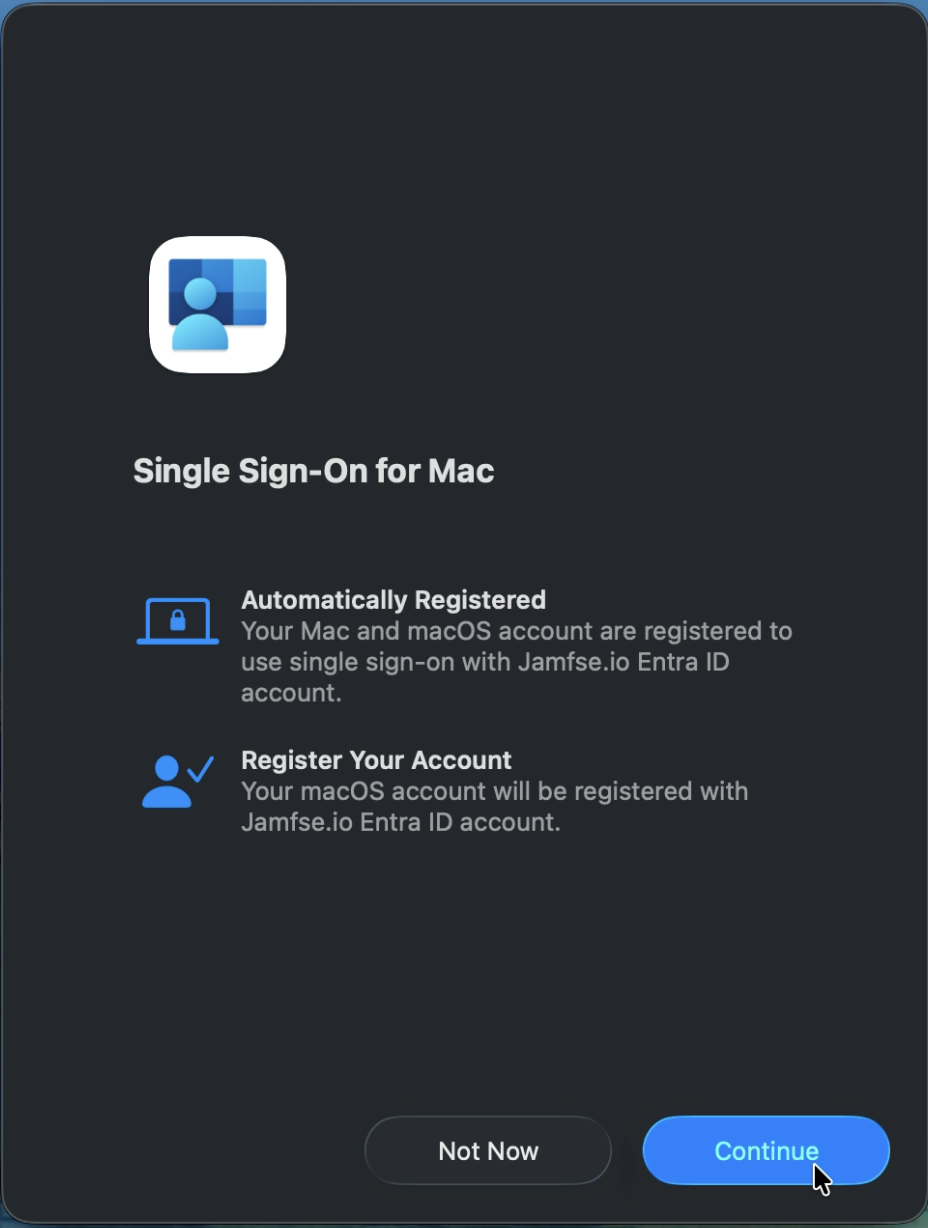 On an existing Mac, macOS prompts the user to register from Notification Center.
How Platform SSO Works
Platform SSO turns the managed Mac into the authenticator.
- The user unlocks the Mac with an IdP password, a Secure Enclave key protected by Touch ID or the local password, a smart card, or, in macOS 27, a web-based sign-in.
- The IdP's SSO extension exchanges that credential for tokens from the IdP.
- macOS presents those tokens to apps and websites that use the IdP, so the user is not prompted again.
After registration, users get single sign-on to:
- Web apps such as Microsoft 365, Salesforce, and Dropbox Business
- Native apps such as Microsoft Outlook, Microsoft Teams, and Slack
- Cloud services and on-premises resources through Kerberos ticket-granting tickets (TGTs), when the IdP issues them
Combine Platform SSO with managed device attestation in Jamf Pro and conditional access in your IdP to require that only a verified user, on a managed and genuine Apple device, reaches your protected resources.
Relationship to Extensible SSO
Platform SSO builds on the Apple extensible SSO framework. A standard SSO extension provides single sign-on to apps after the user signs in to macOS. Platform SSO adds integration with the login window, the Lock Screen, FileVault, and local account management.
Authentication Methods
| Password | Secure Enclave key | Smart card | Access key | Web sign-in (OpenID) | |
|---|---|---|---|---|---|
| Minimum macOS | 13 | 13 | 14 | 26 | 27 |
| What the user enters | IdP password, synced to the local account | Local password or Touch ID unlocks a hardware-bound key | Smart card and PIN | Employee badge in Apple Wallet | IdP sign-in page, including MFA, QR code, or passkey |
| Phishing resistant | No | Yes | Yes | Yes | Depends on the IdP method used |
| Syncs IdP password to the Mac | Yes | No | No | No | Optional, with AllowWebLoginPasswordSync |
| Login, unlock, and FileVault policies | Yes | Touch ID policies only | No | No | Check with your IdP |
| Simplified Setup in Setup Assistant | Yes | Yes | No | No | Check with your IdP |
| Authenticated Guest Mode and account creation at login | Yes | No | Yes | Authenticated Guest Mode only | Yes |
| Best for | Password sync and shared Macs | 1:1 Macs and passwordless sign-in | Regulated environments with PIV or CAC | Shared Macs with Tap to Login | Interactive MFA at the login window |
Features by macOS Version
| macOS | Features added |
|---|---|
| 13 Ventura | Platform SSO with password and Secure Enclave key methods. Silent device registration with a registration token. |
| 14 Sonoma | PlatformSSO settings dictionary. Smart card method. Shared device keys. Account creation at the login window. IdP group membership for administrator and authorization rights. Repair in System Settings. |
| 15 Sequoia | FileVault, login, and unlock policies (FileVault policy on Apple silicon only). Offline and authentication grace periods. Exempt local accounts. |
| 15.4 | Device identifiers in attestation. User principal name prefix as the local account name. |
| 26 Tahoe | Simplified Setup during Automated Device Enrollment. First user account creation in Setup Assistant. Authenticated Guest Mode. Tap to Login with Apple Wallet access keys. Profile picture sync. |
| 27 | Web-based authentication with MFA, QR codes, and passkeys. Require Touch ID or Apple Watch. FileVault unlock for Authenticated Guest Mode. DDM configuration. Lock Screen Wi-Fi and captive portal access. |
Most features require support in your IdP's SSO extension. A feature that macOS supports is not available until your IdP supports it.
Identity Provider Support
| Capability | Microsoft Entra ID | Okta | Ping Identity |
|---|---|---|---|
| SSO extension | Microsoft Company Portal | Okta Verify (from the Jamf App Catalog) | PingID desktop app 2.0 or later |
| Password | Yes | Yes (Desktop Password Sync) | No |
| Secure Enclave key | Yes (Microsoft recommends) | Yes (requires Device-Bound SSO and the Secure Enclave feature enabled in your Okta org) | Yes |
| Smart card | Yes (macOS 14 or later, not in Setup Assistant) | No | No |
| Simplified Setup | Yes (Company Portal 5.2604.0 or later) | Yes (Okta Verify 9.52 or later) | Registration during setup supported |
| Account creation at login | Yes | Yes (password method) | Yes |
| Licensing | Microsoft Entra ID | Okta Identity Engine with Okta Device Access | PingOne for Workforce, PingFederate 13.1 or later |
| Jamf guide | Entra ID guide | Okta guide | Ping documentation |
IdP support changes quickly. Confirm current support in your IdP's documentation before you plan a deployment. Google Workspace does not provide a native Platform SSO extension. For IdPs without Platform SSO support, use Jamf Connect.
Technical Requirements
- Hardware: Mac with Apple silicon. macOS 27 runs only on Apple silicon, and FileVault policies require Apple silicon on all versions.
- Software: macOS 13 or later. macOS 26 or later for Simplified Setup, Authenticated Guest Mode, and Tap to Login. macOS 27 for web sign-in and Touch ID requirements.
- Management: An MDM solution that supports the Single Sign-On Extensions payload, such as Jamf Pro, part of Jamf for Mac. Jamf Pro 11.20 or later for Simplified Setup.
- Identity: An IdP with a Platform SSO extension.
- Network: The Mac must reach the IdP at the login window for FileVault and login policies, Authenticated Guest Mode, and web sign-in. VPN, Jamf network relay, and 802.1X connections are not available before the user signs in.
Planning Your Deployment
- Confirm that your IdP supports the authentication method and features you need.
- Choose an authentication method. Use Secure Enclave key for 1:1 Macs where phishing resistance matters most. Use password when you need local password sync, login policies, or shared-Mac features.
- Decide whether to use Simplified Setup for new Macs. Simplified Setup requires macOS 26 or later and a wipe to change after enrollment.
- Decide how Jamf Connect fits. See Jamf Connect and Platform SSO.
- Pilot with a small group, including at least one Mac that enrolls through Simplified Setup and one existing Mac that registers after setup.
Resources
Apple
- Platform SSO for macOS
- Identity integration updates (macOS 27)
- Configuring Platform Single Sign-on (Apple Developer)
- Apple Platform Security: Secure Enclave
Jamf
- Configuring Simplified Setup for Platform Single Sign-On
- Platform Single Sign-on for macOS with Jamf Pro
- Deploying macOS Platform SSO for Okta with Jamf Pro
- Deploying macOS Platform SSO for Microsoft Entra ID with Jamf Pro
Identity providers
- macOS Platform SSO (Microsoft)
- About Platform Single Sign-On for macOS (Okta)
- Configure Platform SSO for macOS (Ping Identity)
Demo Videos
Simplified Setup for Platform SSO with Okta
Platform SSO Registration with Secure Enclave and Microsoft Entra ID